_edited.png)
Design Thinking Process
This page outlines the design thinking process behind the Testing AI Feedback & Assessment Tools module, highlighting how research, empathy, and instructional design principles informed key design decisions.
Empthaize
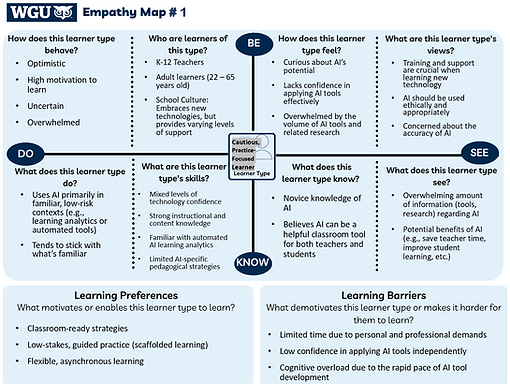
Empathy Map
How Information was Gathered
To inform the learner analysis and empathize phase, I drew on:
-
Scholarly research examining K–12 teachers’ attitudes, perceptions, and AI self-efficacy
-
Informal conversations with practicing K–12 teachers
Key Findings
-
Teachers generally view AI as having strong potential in education
-
AI self-efficacy varies widely, often depending on prior experience and available support
-
Teachers want practical, professional learning focused on how to use AI tools effectively
Design Implications
These insights informed the creation of an empathy map and teacher persona that represent common confidence gaps, instructional needs, and motivations. This grounding ensured the module design reflects authentic educator experiences and supports guided, classroom-ready application.
How the Problem was Defined
Insights from the empathy map, teacher persona, and prior research were synthesized to identify the instructional problem.
-
The empathy map revealed feelings of uncertainty, overwhelm, and a need for structured support when using AI tools
-
The teacher persona reflected an experienced educator with strong instructional skills but low confidence with AI tools
Key Findings
-
Current state: Teachers report low confidence using AI-based feedback and assessment tools in classroom contexts
-
Desired state: Teachers feel confident and prepared to use AI-based feedback and assessment tools with practical, classroom-ready strategies
-
A clear confidence and application gap exists between teachers’ interest in AI and their ability to use it effectively
Instructional Problem
K–12 teachers who lack confidence in using AI need practical guidance to effectively incorporate AI-based feedback and assessment tools into their classroom practice.
Define

Persona
Ideate

Mind Map

Guided Self-Directed Exploration
How Solutions Were Identified
A structured ideation process was used to explore instructional solutions that could support teacher confidence and practical application of AI-based feedback and assessment tools.
-
Divergent and convergent thinking were used to generate and refine multiple design approaches
-
A mind map supported brainstorming across varying levels of instructional support and learner autonomy
-
Potential solutions were evaluated based on alignment to teacher needs, confidence-building, and classroom application
Potential Solutions Considered
-
Demonstration-based guided practice: Step-by-step video modeling with scaffolded practice for novice users
-
Case-based guided practice: Analysis of realistic classroom scenarios using sample student work and AI-generated feedback
-
Guided self-directed exploration: Structured prompts and resources combined with learner choice and hands-on tool exploration
Solution
A guided self-directed exploration model was selected to balance instructional support, learner autonomy, and immediate classroom application.
How the Solution Was Prototyped
A low-fidelity prototype was created to plan the structure, flow, and learner experience of the Canvas-based professional learning module before full development.
-
An outline was developed to map how learning objectives connect to module sections, activities, and assessments, supporting alignment and instructional coherence.
-
Pages were designed with a clear, repeatable layout, including How to Use This Page and What’s Next sections.
-
The prototype supported early testing of learner flow and instructional sequencing across the module.
Design Implications
The solution was intentionally designed with accessibility, usability, and cognitive load in mind to support an inclusive and effective professional learning experience.
-
Accessibility: Consistent headings, readable text, and structured layouts support diverse learner needs and equitable access
-
User Interface & Navigation: Predictable page structure and clear labels reduce friction and support intuitive navigation within Canvas
-
Cognitive Load: Content is chunked into focused sections with guided prompts to support attention and prevent learner uncertainty
Prototype

Low-fidelity Prototype
Test
Evaluation in Progress
The module is currently in the testing phase and is being implemented with participants to evaluate both learner outcomes and learner experience.
-
Learner outcomes: Pre- and post-module surveys are being used to measure changes in teacher confidence and perceived readiness to use AI-based feedback and assessment tools
-
Learner experience: Participant feedback is being collected to examine clarity, usability, and the effectiveness of guided practice activities
-
Formative quiz responses and summative artifacts are being reviewed to assess alignment between learning activities and instructional goals
Findings from this testing phase will be used to inform future revisions and refinements to the module design.